Tutorial: from install to one verified ticket
In this tutorial you run delegate once, from start to end. You make a small sample repository. You bootstrap an agent pair for it. You build one ticket in assure mode on Claude Code. You read the verdict and the journal.
The longest part is the wait for the agents.
Before you start
You need these things:
- Python 3.11 or later.
git.uv, to install the kit.- Claude Code, installed and logged in. The command
claudemust work in your terminal.
The tutorial uses real agents, so the run uses tokens of your Claude Code account.
1. Install the kit
This puts the commands delegate, agent-definitions and verifier-brief on your PATH. This tutorial uses only delegate.
Check that the install worked:
The output lists the subcommands render, validate, bootstrap, brief, run, pause, status, watch and docs.
2. Get the sample files
The sample files are in the repository of the kit. Clone it.
The sample files are in delegate-kit/examples/tutorial. There are six files:
| File | What it is |
|---|---|
words.py and test_words.py |
A small Python function and its test. |
docs/agents/delegation.md |
The gate command and the hotspots of the project. |
.claude/skills/sample-style/SKILL.md |
A skill with the style rules of the project. |
ticket.md |
The ticket that you will build. |
workflow.toml |
The workflow file. It names the ticket, the mode, the gate, and the time limits of a gate and an agent. |
3. Make the sample repository
Make a new directory, start a git repository in it, and copy the sample files in.
mkdir sample
cd sample
git init -b main
git config user.name "Tutorial User"
git config user.email "tutorial@example.com"
cp -R ../delegate-kit/examples/tutorial/. .
The git config lines set a name for the commits. Use your own name if you prefer.
4. Bootstrap the agent pair
The kit builds each ticket with a specialist agent and a verifier agent. The verifier is blind: it gets the ticket and the diff, and never the report of the specialist. The command bootstrap writes both agents for your repository.
delegate bootstrap --repo . --name python \
  --domain "A small Python library with unit tests." \
  --tier standard \
  --skill sample-style \
  --reference docs/agents/delegation.md \
  --gate-command "python3 -m unittest"
The option --gate-command is important. The verifier may run your gate command, and it may run no other build command.
The command prints the files that it wrote:
.claude/skills/python-context/SKILL.mdand.claude/skills/python-context/agents.toml. These are the context skill and the declaration..claude/agents/python-specialist.mdand.claude/agents/python-verifier.md. These are the agent pair for Claude Code.- The same pair for OpenCode, in
.opencode/agents/.
The workflow file names the agents python-specialist and python-verifier. These are the names that --name python made.
5. Commit the sample
The engine builds each ticket in a new git worktree that starts from main. The worktree holds only what is committed. Commit the sample files and the agent files now.
6. Check the plan
Check the workflow file. This command creates no branch, no worktree and no journal.
The command prints the plan. It has one ticket, and the ticket is ready at once. Then it prints the quality check of the workflow. Each line of the check starts with ok, because the sample sets each setting that the check reads. In your own workflow, a warn line names a setting to add or change. Last, the command checks the agent files and the gate of the verifier.
7. Run the ticket
The engine now works on its own. It does these things in order:
- It makes the run branch
run/sampleand a worktree for ticket 1. - It starts the specialist agent in the worktree. The specialist writes the code and the test, and commits them.
- It runs the gate
python3 -m unittestitself. The engine does not trust the report of the specialist for this. - It starts the verifier agent in a temporary copy of the branch. The verifier gets the ticket text and the diff. It runs the gate again and writes its verdict.
- If the verdict is ACCEPT, it moves the run branch to the commit that the verifier saw.
When the run starts, the command prints three lines. When the run ends, it prints a summary line. The output looks like this, without its colours. Your run id, path, times and token counts are different.
run 20261009T031500Z-a1b2
journal /home/you/.local/state/delegate/sample-3f9a1c0b7d42/runs/20261009T031500Z-a1b2/journal.jsonl
follow it with delegate watch · pause it with delegate pause a1b2
run built · 4m03s · 1 built · 0 failed · 0 skipped · 39k new · 0 cache
a1b2 is the short run id, the part of the run id after the last -. delegate status, delegate watch, delegate pause and delegate run --resume take it in place of the full run id. The command exits 0 when the ticket is accepted.
While the run goes on, you can follow it from a second terminal with delegate watch. With no run id, it follows the active run. On a terminal, it shows a live view of the tickets and of the events of the ticket that runs.
The figure shows the live view of a larger run, with 11 tickets. The text under it is the same view with no colour.
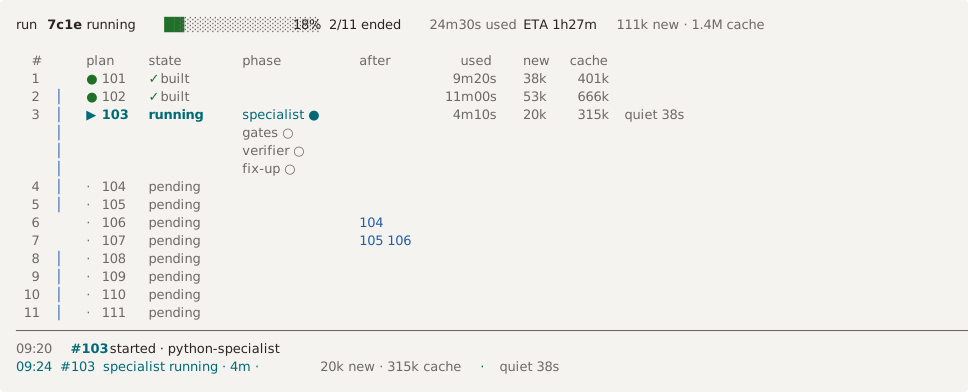
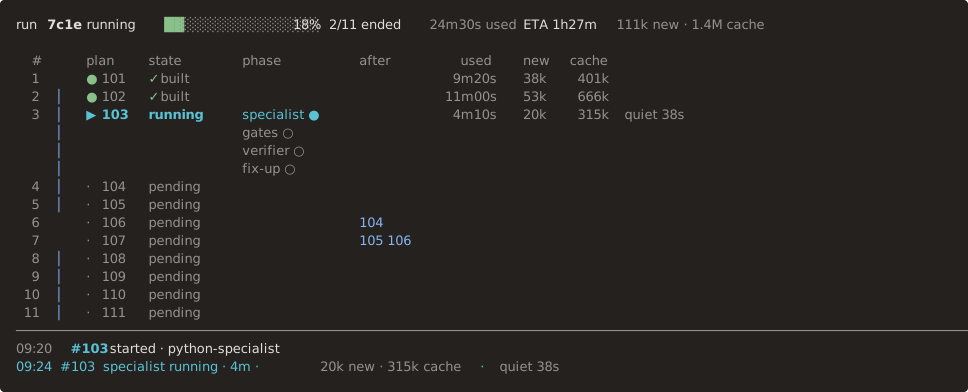
run 7c1e  running  ██░░░░░░░░░░░░░░ 18%  2/11 ended  24m30s used  ETA 1h27m  111k new · 1.4M cache

  #      plan    state       phase          after        used    new   cache
  1      ● 101   ✓ built                                9m20s    38k    401k
  2  │   ● 102   ✓ built                               11m00s    53k    666k
  3  │   ▶ 103   running     specialist ●               4m10s    20k    315k  active 38s ago
     │                       gates ○
     │                       verifier ○
     │                       fix-up ○
  4  │   · 104   pending
  5  │   · 105   pending
  6      · 106   pending                    104
  7      · 107   pending                    105 106
  8  │   · 108   pending
  9  │   · 109   pending
 10  │   · 110   pending
 11  │   · 111   pending
────────────────────────────────────────────────────────────────────────────────────────────────────────────────────────
09:20  #103  started · python-specialist
09:24  #103  specialist running · 4m · 20k new · 315k cache · active 38s ago
To stop the run at its next step boundary, use delegate pause a1b2. The run then stops, and delegate run exits 3. Ctrl-C stops the run at once, and the command exits 130. After either one, delegate run --resume a1b2 goes on with the run.
If the verdict is REJECT, the engine starts a fix-up round. The specialist adds a new commit, and a new verifier checks it. The limit is two rounds. The reference page for delegate run has the details.
8. Read the result
Show the state of the run:
The output looks like this, without its colours. Your run id, path, times and token counts are different.
run 20261009T031500Z-a1b2: built (mode assure, adapter claude-code)
progress: 100%, 1 of 1 ended, 4m03s used, tokens 39k new, 0 cache
journal /home/you/.local/state/delegate/sample-3f9a1c0b7d42/runs/20261009T031500Z-a1b2/journal.jsonl

  #      plan    state     phase          after     verdict  branch              used    new   cache  last event
  1      ● 1     ✓ built                            ACCEPT   run/sample-1       4m01s    39k       0  2026-10-09T03:19:02.512384+00:00
The state built and the verdict ACCEPT mean that the ticket is done and checked.
9. Read the verdict and the journal
The verifier writes its verdict to a file. Read it:
The path is the directory of the journal line, without the file name. If you set XDG_STATE_HOME or DELEGATE_STATE_ROOT, the directory is under that root.
The file holds these things:
- The verdict.
- The evidence for each acceptance criterion.
- The output of the gate.
- The findings.
- The
unverifiedlist. The verifier lists there what it could not check. Read this list with care.
The journal records each event of the run, in order. Print it:
The run ended, so no run is active. --from 0 replays the journal of the newest run from its first event. --raw prints one line for each event, in place of the live view. The line names the event, for example step-start, gate-result, verdict, run-branch-advance and run-end. After run-end, the command prints the line position <seq> and ends. It exits 0 because the run succeeded.
With no option, delegate watch prints only one line here: the result of the newest run.
10. Take the work
The engine never merges to your base branch. The merge is your action. The run branch holds only accepted work, so a fast-forward is enough.
The log now shows the commits of the specialist on main.
What you did
You ran the whole loop once:
bootstrapwrote an agent pair from one interview.runbuilt the ticket in a worktree, ran the gate outside the specialist, and verified the result with a blind verifier.statusandwatchshowed the state and the journal.- You merged the branch yourself.
Next steps
- How to write a workflow for a run gives the choices of a workflow with many tickets. The workflow file gives each field.
- The
delegate runreference explains the fix-up round, the pause, the resume of a stopped run, and the guards. It also explains the plan change, which adds a ticket to a run. - The reference for
delegate statusanddelegate watchlists the exit codes that a coordinator can act on.